How AI CRM Tools Turn Conversations into Sales Data Automatically
AI CRM tools can automatically turn WhatsApp, LinkedIn, and email conversations into structured sales data, and this guide explains exactly how that process works and what to look for in a platform that does it well.

How AI CRM Tools Turn Conversations into Sales Data Automatically
Most CRMs are data graveyards. Not because sales teams don't care about data quality, but because the gap between where selling happens and where data is supposed to live is too large to bridge consistently. A rep takes a call, learns something important, and then has to choose between logging it and doing their next thing. Most of the time, they do their next thing.
AI CRM conversation data changes this dynamic entirely. The idea is not to remind reps to log things. It is to remove logging from the equation by capturing what happens in conversations automatically, across every channel where selling actually occurs.
This piece explains how that works technically, what it captures, and what separates systems that genuinely do this from systems that claim to.
The Problem: Why Sales Conversations and CRM Data Live in Different Worlds
The conventional CRM model assumes that information travels in one direction: rep has a conversation, rep opens CRM, rep types what happened. That assumption was always fragile. It became untenable when selling moved across three or four channels simultaneously.
Today a single deal might involve an email thread, a LinkedIn DM, two WhatsApp exchanges, and a video call. The rep is supposed to log all of it. In practice, they log the call because the CRM prompted them to, and the WhatsApp messages never make it in because there is no prompt and no easy way to copy a conversation into a text field.
The result is a CRM that captures roughly 40-50% of what actually happened on any given deal. Managers reviewing pipelines are looking at partial information and don't know it. Forecasts built on that data inherit the same gaps.
This is not a discipline problem. Expecting a rep to manually log conversations across four channels while also hitting activity targets and managing a full pipeline is unrealistic. The system is asking for too much. Blaming the rep for not doing it is the wrong diagnosis.
The structural fix is a CRM that reads the conversations directly, rather than waiting for a human to transcribe them.
How Conversation-to-CRM Actually Works: The Technical Flow
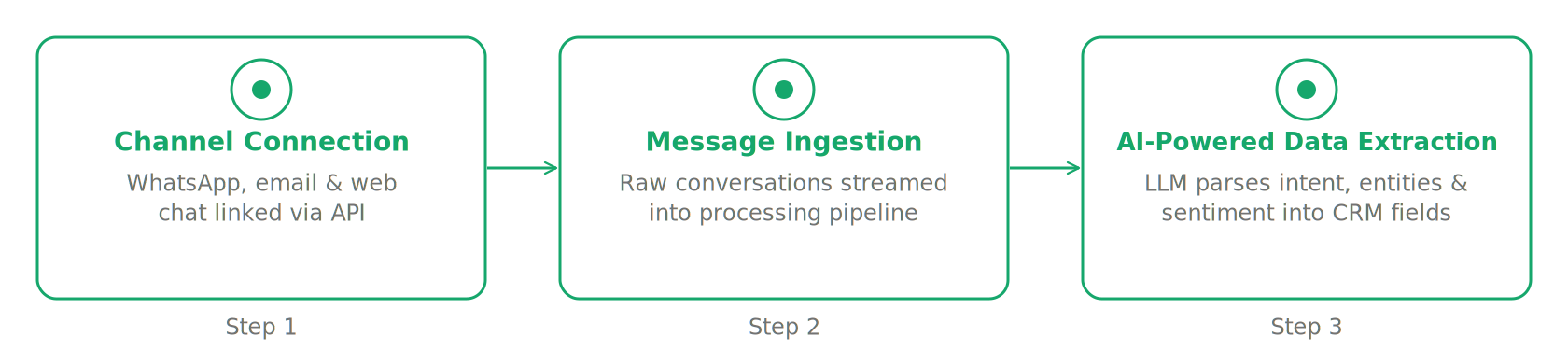
At a high level, the process works in three stages: connection, ingestion, and structuring.
First, the CRM connects to the channels where conversations happen. For email, this is an OAuth integration with Gmail or Outlook. For LinkedIn, it requires a browser-level sync that reads DMs from the LinkedIn interface. For WhatsApp, it typically requires linking the phone number to the CRM, either through the Meta Business API or through a personal WhatsApp sync that does not require a business account.
Once connected, the CRM ingests messages as they come in. Not by pulling daily exports. In real time, or close to it. Each message is associated with a contact record based on sender information: phone number, email address, or LinkedIn profile URL.
The structuring step is where AI does the work that matters. The raw message text is passed through a model that identifies what type of information is present: contact details, company context, deal stage signals, stated objections, next steps, timelines, budget indicators, and so on. The model then writes that information into the appropriate CRM fields, updating a deal stage, creating a task, logging a note, or flagging a sentiment shift.
The important distinction is between systems that simply log conversations as a transcript and systems that extract structured data from them. A transcript attached to a contact record is better than nothing, but it still requires a human to read it and act on it. Structured extraction means the CRM is updated without the human reading anything.
What Data Gets Captured from WhatsApp, LinkedIn, and Email Conversations
The data that can be captured differs meaningfully by channel, and it is worth understanding what each channel actually yields.
WhatsApp is the richest channel for capturing informal deal context. Conversations are direct, frequent, and often contain the kind of candid information a prospect would never put in an email. A prospect messages "we need this live before end of quarter" (that is a timeline and an urgency signal in one sentence). A voice note from a rep after a site visit contains observations that would otherwise exist only in their head. WhatsApp conversations also tend to happen at higher frequency than email threads, which means there is more raw material for the AI to work with.
LinkedIn conversations typically capture earlier-stage signals. Initial interest, first objections, ICP qualification signals, mutual connections mentioned as references, and the point at which a prospect agrees to move to email or call. Because LinkedIn conversations are shorter and more formal than WhatsApp exchanges, what the AI extracts is less rich per message, but the channel fills a gap that most CRMs have left entirely empty. If a prospect expresses interest over LinkedIn and nobody logs it because the CRM does not connect there, that conversation effectively does not exist as far as the pipeline is concerned.
Email has the longest history of CRM integration, but most implementations stop at logging. The email thread is attached to the contact record as a file rather than being parsed for content. A genuinely capable system reads the email thread and identifies what changed since the last message: a new objection raised, a stakeholder introduced by name, a specific product requirement mentioned. It writes that as a structured update rather than a raw thread attachment.
Across all three channels, the categories of data being captured include: contact and company information, conversation sentiment, deal stage signals, objections and concerns raised, stated next steps, timeline and urgency indicators, and stakeholder mapping.
AI's Role: Extracting Contacts, Sentiment, and Next Steps from Messages
The extraction layer is what separates conversation intelligence CRM from simple conversation logging. Any CRM can store messages. The question is whether the system understands what those messages mean for the deal.
Contact extraction is the most straightforward application. A rep sends a WhatsApp message to the CRM describing a business card they just scanned at an event: name, title, company, email, phone. The AI creates the contact record and links it to any existing company record. No form to fill out. No risk of the contact being lost in a notes app.
Sentiment analysis is more nuanced. When a prospect who was previously engaged starts giving short answers and stopping conversations on WhatsApp, that shift is detectable. The AI is looking at response time, message length, the presence of commitment language versus hedge language, and the direction those signals are moving over the last three to five exchanges. A deal that shows declining engagement signals is flagged before the rep has consciously registered the shift.
Next-step extraction is arguably the most immediately useful. If a rep's email includes "let's reconnect Thursday" and the CRM creates a follow-up task dated accordingly, that is pipeline hygiene happening automatically. If a prospect's message includes "can you send over the contract by Friday?" and the AI surfaces that as a next-step item on the deal record, the rep does not have to remember it.
The question teams ask at this point is whether automatic to CRM updates actually produce better data than manual entry or just faster data. The honest answer is: usually both. Manual entry is slower and subject to selective memory. A rep who had a disappointing call is less likely to log every objection accurately than a system that read the transcript.
There is a ceiling, though. AI extraction is not perfect. It will occasionally miscategorize sentiment, miss context that requires industry knowledge to interpret, or create a contact record with a field error. The practical benchmark is whether the AI-generated data is more complete and more consistent than what the rep would have entered manually. Across most sales teams, that bar is not hard to clear.
What to Look for in a CRM That Does This Well
Not every CRM that describes itself as AI-powered actually performs automatic CRM updates at the conversation level. A few criteria separate the real implementations from the marketing copy.
Channel breadth matters more than depth on one channel. A CRM that reads your email perfectly but has no WhatsApp or LinkedIn integration is capturing a fraction of your deal intelligence. Most B2B deals in 2026 involve at least two channels. If your CRM only fully understands one of them, you have a partial picture.
Native integration beats third-party middleware. A CRM that integrates WhatsApp through Zapier can log messages in theory. In practice, you will spend time troubleshooting sync failures, handling edge cases, and explaining to your team why some messages appear and others do not. A native integration means the CRM owns the connection end to end, which means it controls reliability and data fidelity.
Extraction quality is testable before you buy. Ask the vendor to show you what a WhatsApp conversation looks like after it has been processed. Are you seeing a raw transcript, or are you seeing structured fields updated in the contact and deal record? If the demo shows you the transcript view, ask where the structured data is. If the answer involves clicking through to the attachment, that is a logging system, not an extraction system.
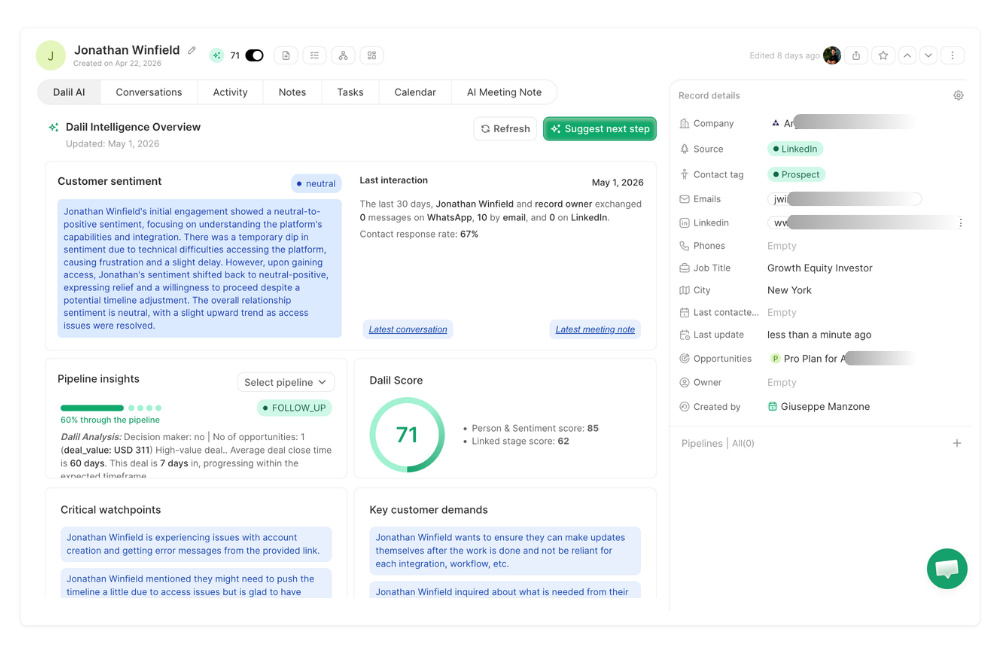
Cross-channel AI summaries are the real signal. Does the CRM surface AI summaries per record that synthesize across channels? A rep following up on a deal should be able to click one button and get a structured brief that reads email threads, WhatsApp exchanges, and LinkedIn DMs together, then tells them where the deal stands, what the prospect's stated concerns are, and what should happen next. That cross-channel synthesis is only possible if all three channels are being ingested and structured natively.
Finally, the feedback loop determines long-term data quality. Can reps correct AI-generated data easily? If the AI creates a contact record with a wrong title, can the rep fix it in two taps? A system with no easy correction mechanism will accumulate errors over time, which defeats the purpose of automatic data capture entirely.
Teams making this evaluation often find that the CRM they are already using handles one of these criteria reasonably well and fails on two or three others. That is usually the moment the conversation about the full sales tool stack becomes inevitable, because stitching together a CRM that handles email with a separate tool for WhatsApp and another for LinkedIn reproduces the same fragmentation problem that conversation-to-CRM is supposed to solve.
Dalil captures conversations across WhatsApp, LinkedIn, and email natively, extracts structured data into contact and deal records automatically, and synthesizes across all three channels in Dalil Brain. This is a one-click AI summary available on every record. Ask Dalil extends this further by letting reps update the CRM from WhatsApp directly, including by voice note or business card photo. For teams evaluating this category seriously, it is worth seeing how those two capabilities interact in practice.
FAQ Section
How do AI CRMs capture data from WhatsApp conversations?
The CRM connects to WhatsApp by linking a phone number, either through the Meta Business API or a personal WhatsApp sync that requires no business account setup. Once connected, incoming and outgoing messages are ingested in real time, associated with existing contact records based on phone number, and parsed by an AI layer that extracts structured information: contact details, deal signals, sentiment shifts, next steps. It writes them into the appropriate CRM fields without manual input.
What sales data can AI extract from a conversation?
The main categories are contact and company details, deal stage signals (interest, objections, buying intent), sentiment direction over a conversation thread, stated timelines and urgency indicators, stakeholder information mentioned in passing, and explicit next steps agreed in the conversation. The extraction quality varies by system, but a well-built AI layer can reliably identify all of these from natural conversation text across email, WhatsApp, and LinkedIn.
Do AI CRMs work with LinkedIn messages?
Some do, most do not. LinkedIn integration in CRMs ranges from manual exports to browser-level sync that reads DMs as they arrive. The latter is more useful because it captures conversations in real time rather than requiring a rep to export periodically. If LinkedIn is a meaningful outreach or inbound channel for your team, native LinkedIn DM integration should be a non-negotiable criterion in your CRM evaluation.
How accurate is AI-generated CRM data compared to manual entry?
For completeness, AI-generated data is consistently better (it captures everything in the conversation rather than what the rep remembered to type). For precision, the comparison depends on the quality of the AI layer, but well-implemented systems match or exceed human accuracy for structured fields like contact details, dates, and next steps. Where AI can miss nuance is in complex, context-dependent sentiment or industry-specific signals that require domain knowledge to interpret correctly. In practice, the combination of AI extraction plus easy rep correction outperforms manual-only entry on both dimensions.
More from the blog
Best Outreach Tools in 2026: How to Choose the Right Platform for Your Sales Team
A practical buyer's guide to outreach tools in 2026, covering what to look for, how leading platforms compare, and when to consolidate into a CRM-native outreach system instead.
CRM for Logistics and Freight: How to Track Deals When Everything Runs on WhatsApp
Logistics and freight teams run deals on WhatsApp, but no conversation gets captured in a CRM. This guide explains how to fix that without changing how your team works.
Multichannel Sales: How to Run Email, LinkedIn, and WhatsApp Outreach from One Place
A practical guide to running email, LinkedIn, and WhatsApp outreach from a single system, covering how the three channels work together and what it takes to measure and manage them without losing context.