Lead Routing: How to Assign Leads to the Right Rep Every Time
Lead routing determines which rep gets which lead and when; here is how to set up a system that improves speed, fit, and conversion without overcomplicating it.

Lead Routing: How to Assign Leads to the Right Rep Every Time
Lead routing is the process of assigning inbound leads to the right sales rep based on predefined rules. That's the complete definition. It sounds simple because the concept is simple. The execution is where most teams create problems for themselves.
Get it right and leads reach the right rep fast, with full context, and with a real chance of converting. Get it wrong and leads sit in a queue, land with the wrong person, or arrive with no context at all. You've probably seen what the second scenario looks like: a rep follows up three days late on a hot lead, or a technical buyer gets handed to the newest SDR who has no idea what to say.
This is a foundational part of crm lead management software and one that's worth getting right before you invest in anything else.
What Is Lead Routing
Lead routing is the mechanism that decides, the moment a lead enters your system, who owns it and what happens next. It covers three decisions: which rep gets the lead, how fast they're notified, and what information they receive when they pick it up.
Most teams start with manual routing. Someone reviews new leads each morning and distributes them in a spreadsheet or by tagging reps in a shared inbox. This works until it doesn't, usually around the point where lead volume outpaces one person's ability to sort them without introducing delays or errors.
Automated lead routing applies rules to handle that distribution automatically. A lead comes in, the system reads its attributes (industry, geography, deal size, source, ICP score), matches those attributes against your routing logic, and assigns the lead to a rep, sometimes in under a second. The rep gets a notification, the CRM record is created, and the clock on response time starts.
The routing logic can be as simple as "assign every lead from Europe to this rep" or as sophisticated as "assign leads from enterprise accounts in manufacturing to whichever of these three AEs has the lowest open pipeline by value." The right level of complexity depends on your team size and how differentiated your reps actually are.
One thing worth clarifying: lead routing is not the same as lead scoring. Scoring tells you how good a lead is. Routing tells you who gets it. They're related, as score-based routing uses lead scores as an input to the routing decision, but they are distinct steps in the process.
Why Lead Routing Matters for Conversion
The research on speed-to-lead is consistent enough to be treated as fact at this point. Responding to a lead within five minutes produces dramatically higher contact rates than responding within thirty minutes, and the gap between thirty minutes and twenty-four hours is even more pronounced. Every routing delay that slows down the first response is a conversion problem.
But speed is only part of it. Lead conversion also depends on fit between the lead and the rep. A rep who handles mid-market SaaS deals every day knows how to run that conversation differently from a rep who handles SMB retail. When routing ignores fit and just round-robins leads across the team, you get mismatched conversations, and mismatched conversations convert at lower rates regardless of how fast the rep responds.
There's a third factor that doesn't get enough attention: context. When a lead arrives with their company size, industry, source, and any prior interaction history already attached to the record, the rep can personalize the first message immediately. When a lead arrives as a name and an email address with no additional data, the rep either delays to research or reaches out cold without context. Neither option is good for conversion.
Routing is the invisible architecture behind all three of these variables. It controls speed, fit, and context simultaneously. Teams that treat it as an afterthought (something to figure out later once volume picks up) usually discover later that they've been leaving conversion on the table the entire time.
Lead Routing Methods: Round Robin, Territory, Score-Based
There are three routing methods worth understanding. Most mature teams end up combining them.
Round robin routing distributes leads sequentially across a pool of reps, one at a time in rotation. Rep A gets lead one, Rep B gets lead two, Rep C gets lead three, then back to Rep A. It's fair, it's simple to set up, and it works well when your reps are genuinely interchangeable, with similar experience levels, similar territories, and similar product knowledge. The weakness is that it treats all leads the same. A highly qualified enterprise lead from a VP of Sales and a borderline-fit lead from a two-person startup both land with whoever is next in the queue.
Territory-based routing assigns leads based on geography, industry, company size, or some other segmentation criterion. Rep A owns fintech leads in North America. Rep B owns manufacturing leads in Europe. This makes sense when your reps have built genuine expertise in specific verticals or regions, and when that expertise produces better conversations and higher win rates. The downside is workload imbalance, as some territories generate three times the lead volume of others, and the routing system doesn't automatically correct for that.
Score-based routing uses lead score as the primary routing variable. High-scoring leads go to your most experienced closers first. Lower-scoring leads go to reps who are still developing. This is arguably the most commercially intelligent of the three methods because it aligns your best resources with your best opportunities. The catch is that it requires a scoring model that you actually trust. If your scores are unreliable, score-based routing amplifies the problem rather than solving it.
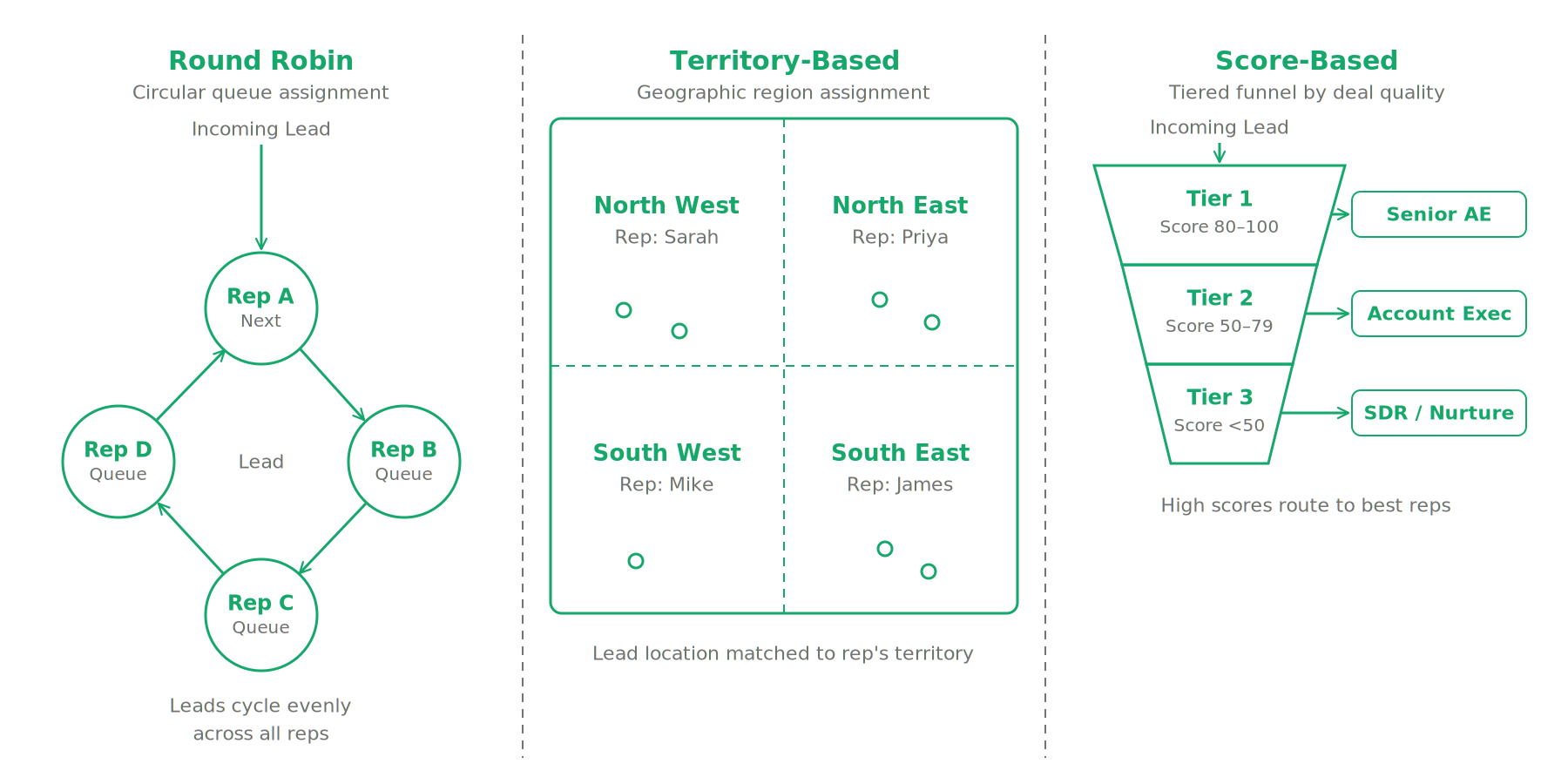
For most teams, the answer is a hybrid. Round robin within a territory, with score-based overrides for leads above a certain threshold. This preserves fairness and specialization while making sure your best leads don't end up in the wrong hands by accident.
How to Set Up Lead Routing in Your CRM
Setting up lead routing in a CRM is a configuration exercise, not a technical project. Here's what the setup process actually looks like.
Stage 1: Define your routing criteria. Before you touch any CRM settings, write down the logic you want to apply. Which rep owns which type of lead? What attributes matter (geography, company size, industry, lead source, ICP fit)? What happens when a lead matches more than one rule? What's the fallback when no rule matches? Get this logic documented in plain language before you try to configure it anywhere.
Stage 2: Make sure your lead data supports the logic. If your routing logic says "assign leads from enterprise accounts to Rep A," the CRM needs to know which leads are enterprise accounts. That means your forms, imports, and enrichment tools need to be capturing and populating company size on every lead record. Routing logic is only as good as the data it reads. Run a quick audit: for the last 50 leads in your system, how many have the fields your routing rules will rely on?
Stage 3: Build the routing rules in your CRM. Most CRMs handle this through workflow automation. A trigger fires when a new lead record is created. The workflow reads the lead's attributes, matches them against your rules in sequence, and applies an assignment action. In Dalil, this is done through Workflows, where you define the trigger, add if-else logic for each routing condition, and set the assignment action. The workflow runs automatically from that point forward.
Stage 4: Set up rep notifications. Assignment without notification is useless. Make sure the rep receives an immediate alert (ideally in whatever channel they're actually in) the moment a lead is assigned to them. A task with no deadline attached to a lead record nobody is watching is not a notification.
Stage 5: Test before you go live. Create five test leads with different attribute combinations and trace what happens. Does the enterprise lead go to Rep A? Does the fallback fire when no rule matches? Does the rep get notified? Run the test before real leads are flowing through the system.
One thing that trips teams up: routing rules and routing maintenance are two different things. You can have perfect rules on day one that become wrong six months later because a rep left, territories changed, or your ICP shifted. Build a quarterly review of your routing logic into someone's responsibilities before you need it.

Lead Routing for Small Teams Without a RevOps Hire
If you're a team of two to five reps without dedicated sales operations, there's a real temptation to skip routing entirely and just handle assignment manually. This is understandable and, up to a point, fine. But there are two things that break down when you keep routing manual as the team grows.
First, manual routing creates a bottleneck on whoever is doing the assigning. If that person is on holiday, on a call, or simply overwhelmed, leads wait. Speed-to-lead drops. Conversion follows.
Second, manual routing generates no data. You can't analyze which assignments are producing better outcomes, which territories are over- or underloaded, or how routing decisions are affecting pipeline. That information disappears into someone's judgment calls and never gets reviewed.
For a small team, the right approach is to start simple and automate what you can. Round robin across the full team with one override rule (for example, any lead from an existing customer account goes directly to the account owner). That's it. Set it up as a workflow in your CRM, test it once, and let it run. You can layer on territory logic or score-based routing once you have enough data to know what the right criteria actually are.
The GTM Foundation approach works well here: build the minimum viable routing system that removes the manual bottleneck and creates a data trail. You don't need a RevOps hire to do this. You need thirty minutes and a CRM that can run conditional assignment logic without requiring a developer.
Small teams also tend to underestimate how much faster they can respond when routing is automatic. When a lead hits the CRM and the assigned rep gets an immediate notification on their phone, the response time goes from "whenever someone checks the queue" to "within minutes." That gap is where a lot of early-stage pipeline either gets won or lost.
The biggest mistake small teams make with lead routing is waiting until they feel like they have a routing problem before building a system. By the time you feel the problem, you've already lost leads you didn't know you lost.
FAQ Section
What is lead routing? Lead routing is the process of automatically assigning incoming leads to specific sales reps based on predefined rules. Those rules can use attributes like geography, company size, industry, lead source, or lead score to determine which rep is the best fit for each lead.
How does lead routing improve conversion rates? Faster assignment reduces response time, and faster response time produces higher contact rates. Beyond speed, good routing ensures leads land with reps who have relevant experience and context, which improves the quality of the first conversation. Both factors directly affect whether a lead converts.
What is the best lead routing method for small teams? Round robin with one or two override rules is the right starting point. It's fair, simple to configure, and removes the manual assignment bottleneck without requiring complex scoring infrastructure. Add territory or score-based logic once you have enough pipeline data to know what the right segmentation criteria are for your team.
Can you automate lead routing in a CRM? Yes, and most modern CRMs support it natively through workflow automation. You define the trigger (new lead created), the routing logic (if-else rules based on lead attributes), and the assignment action (assign to rep, create task, send notification). Once the workflow is live, routing happens automatically without any manual input.
More from the blog

Lead Enrichment: What It Is and How It Improves Your Sales Data
Lead enrichment fills the gaps in your contact records automatically, and understanding how it works can be the difference between a pipeline that moves and one that stalls.

How to Build a Sales Pipeline from Scratch
A practical guide to building a B2B sales pipeline from scratch, covering stages, software choices, and the mistakes that quietly kill pipeline health before you notice them.

What Is Prospecting in Sales? A Practical Guide for B2B Teams
A practitioner's guide to sales prospecting for B2B teams, covering definitions, how prospecting differs from lead generation, effective methods, and the best tools to use.